Tag Archive for: open source

Konsulko Group: The Year in Review 2025

In 2025, as in our previous 13 years in business, Konsulko Group focused on the practical hardware and software engineering that help companies build breakthrough embedded devices. More and more, this has been with a specific emphasis on deploying Edge AI. We worked alongside companies creating real-world products using AI-capable hardware in medical devices, robotics, smart transportation, and industrial automation.

Beyond our core services, we announced a new platform for Edge AI and published technical guides to address common integration challenges. The following highlights cover the technical work and resources we delivered this year to support embedded product development.

Introducing Konsulko Orca OS for Edge AI

On November 2, we launched Konsulko Orca OS, the production-ready Linux operating system designed for secure, high-performance AI applications on NVIDIA Jetson platforms. Built on the Yocto Project, and delivered as part of Konsulko Group’s software services, Orca OS is engineered from the ground up for deployment in real-world, commercial products, featuring long-term support, secure boot, encrypted storage, hardened production builds, remote diagnostics, reliable over-the-air (OTA) updates and cloud management.

Konsulko also offers end-to-end Jetson development services for the entire NVIDIA Jetson family, including custom hardware designs, board bring-up and application integration with OTA updates.

Custom Hardware for Complex Embedded Systems

Konsulko continued to deliver hardware design services ranging from schematic capture and PCB layout to rapid prototyping, custom SOMs and carrier boards, to manufacturing management. Serving the consumer electronics, medical, telecommunications, and industrial sectors, our engineers integrate robust hardware design with secure, production-ready software to accelerate our customers’ deployment of their devices.

Production Engineering for Medical and Utility Robotics

Our services work in 2025 focused heavily on deploying Edge AI in regulated and industrial environments. For example, we provided a production-secure, encrypted OS using Yocto and a mainline Linux kernel to serve as a base for AI applications operating at the edge for smart grid monitoring systems. 

Konsulko assisted with two separate medical device projects, both built on the NVIDIA Jetson platform. For both projects, we migrated the underlying OS from NVIDIA L4T to a production-ready Yocto Project distribution. A key requirement was creating and maintaining a custom SDK to enable their developers to build CUDA applications. Additionally, we ensured another medical device running on Yocto remained current by updating it with the latest NVIDIA SDK releases.

Addressing Hardware Security on NVIDIA

Implementing a full Chain of Trust on high-performance SoCs remains a significant challenge for engineering teams. In July, we published the technical guide, Cybersecurity on NVIDIA: Why Embedded Lags Enterprise Linux.

Embedded Linux systems, even on popular platforms like NVIDIA Jetson, can sometimes lag behind enterprise Linux distributions in terms of cybersecurity practices and promptness of security updates. This guide provides a high-level overview of the methodology and components utilized to secure Jetson hardware on production projects. 

The process establishes a hardware-based root of trust, which is then extended to verify the integrity of every subsequent boot stage, all the way to the Linux userspace. Furthermore, the solution incorporates encryption-at-rest to protect sensitive intellectual property in deployed systems.

Standardizing Hardware-in-the-Loop Testing (Labgrid)

At Open Source Summit Europe in August, Konsulko Principal Software Engineer Tim Orling (with Trevor Gamblin of Bay Libre) presented Powering Up: Lab Automation With Labgrid and CI. This highlighted a standardized testing infrastructure we can use for customer projects. 

We can utilize Labgrid (a Python library for embedded control) to integrate physical boards into the Continuous Integration pipeline. Instead of relying on QEMU or manual QA, we automate power cycling, serial console interaction, and GPIO manipulation on actual hardware to catch regressions in the boot process or hardware interaction layers before code reaches the client.

We have also leveraged this capability to support the U-Boot community. Specifically, we enabled the community to run their existing test suite automatically in Gitlab CI. This automation covers four distinct hardware platforms and various software configurations.

Executing Windows CE to Linux Migration

As Konsulko Principal Software Engineer George McCollister described in his technical blog post Migrating from Windows CE to Yocto-based Embedded Linux in January, our team managed several legacy migration projects for industrial customers. These projects involved porting application logic from deprecated Windows CE environments to supported Yocto Project-based Linux builds. 

We delivered modernized OS images that maintained existing application behavior while moving the underlying system to long-term supported (LTS) kernels, mitigating the security risks associated with end-of-life operating systems.

Explaining “Embedded Systems” to professionals in other fields

Those of us working in this field for 20-30 years (or more) can sometimes forget that the basics — what these systems are and the steps we take every day to make them work — may seems very foreign to folks in corporate management, finance, or students and newcomers to embedded engineering.

To this end, Konsulko Group started a series of informational articles. The first asks the overarching question: What is Embedded Systems Design?

Continuing our Contribution to Open Source communities

Throughout 2025, Konsulko engineers maintained their seats on the OpenEmbedded Board of Directors and the Yocto Project Technical Steering Committee, and played a key role in organizing and presenting at multiple community events. Our engineers continue in the role of project maintainer and make significant contributions to numerous Open Source projects.

We look forward to working with you in 2026 on building your next embedded device. Please contact us anytime to discuss your new or on-going hardware and software requirements.

Cybersecurity on NVIDIA: Why Embedded Lags Enterprise Linux

Embedded Linux systems, even on popular platforms like NVIDIA Jetson, can sometimes lag behind enterprise Linux distributions in terms of cybersecurity practices and promptness of security updates. Here’s why:

Customization and Divergence

Embedded Linux systems often involve significant customization and the use of specialized components (including NVIDIA hardware), which can diverge from the more homogenous use cases served by the enterprise Linux vendors that have one-size-fits-all distributions.

Resource Constraints

Embedded devices typically operate with limited resources (power, memory, processing power). These constraints can hinder the adoption of certain advanced security features available in enterprise Linux environments.

Update Cycles

Embedded systems, especially in critical infrastructure or applications, often have longer lifecycle requirements (lasting 10 years or more) compared to enterprise systems (typically 3-5 years). Constraints on cost and available bandwidth for metered data service (such as an LTE modem) can be a consideration as well. This can result in slower security patching and updates, leaving devices vulnerable to known exploits.

Threat Models

Embedded systems often face a different threat model compared to enterprise systems, including the possibility of physical access by attackers. This requires a tailored approach to security that may not be fully addressed by enterprise-focused solutions.

Less Stringent Security Measures

Traditionally, embedded devices sometimes lack robust mechanisms for detecting tampered files or unauthorized data access, making them attractive targets for offline attacks. 

Making Embedded Systems Secure

Konsulko Group has always worked with our customers to help them build secure embedded products, including new “AI on the Edge” devices on NVIDIA platforms.

Building a Chain of Trust

Konsulko engineers use their expertise to establish a secure boot process, ensuring the integrity of the system and core software from boot-time to end-of-life. This involves encrypting, verifying, and measuring the integrity of the system and core software at each stage.

Integration with Yocto Project and Key Management

We integrate security technologies within the Yocto Project framework for embedded Linux development, and manage cryptographic keys, which are crucial for secure communication and data protection.

On-Going Support and Maintenance

We offer services to support the long-term security and maintenance of these systems, helping to bridge the gap between enterprise and embedded security practices over the device’s lifecycle.

Security, Secure Boot and Chain-of-Trust Experts on NVIDIA platforms

Konsulko Group has extensive expertise in commercial device security, with proven expertise in security-critical and production-ready systems. We have an embedded-first mindset with a focus on long-term maintainability, and have been a trusted partner in embedded Linux and NVIDIA ecosystem development.

Our engineers have had over two decades working with the open source technologies necessary to help you effectively manage and support the security of your project. We have real customer success across medical, industrial, transportation and defense sectors.

Please contact us to learn how our engineering team can accelerate your next embedded product.

Migrating from Windows CE to Yocto-based Embedded Linux

After 27 years, Windows CE, later known as Windows Embedded CE and Windows Embedded Compact, reached its end-of-life in 2023. Konsulko Group has been helping customers who formerly used Microsoft’s OS for embedded devices to transition to Linux. This short article by Konsulko Principal Software Engineer George McCollister outlines the steps.

Choosing the right software components and tools

Linux, with its vast hardware support and software ecosystem is a natural replacement for device manufacturers that used Windows CE to migrate their product offerings.

The Yocto Project unifies the OpenEmbedded build system and other tools to provide a powerful launch platform for your Embedded Linux device. Recipes for hundreds of software packages are included and thousands more are available through 3rd party layers. Most SoC vendors provide a Yocto compatible BSP (Board Support Package) layer with recipes for building a boot loader and OS kernel. It’s also possible to create your own BSP layer either from scratch or to extend a vendor provided layer.

The most important part of the Windows CE to Yocto-enabled Embedded Linux transition process is understanding the available software components and tools so you can choose the most suitable replacements. It’s common for Windows CE devices to have more custom software since the software ecosystem is much smaller than Embedded Linux. It’s critical to identify which custom software can be replaced with software provided by Yocto Project and third-party layers. Choosing the correct existing tools, drivers, libraries and frameworks will provide a smoother transition and more robust, easy to maintain final product.

Getting Started

A good first step is to perform the Yocto Project Quick Build. This will familiarize you with the basics required to build an Embedded Linux Image and find the appropriate BSP layer for your hardware. Once you add a BSP layer you can build an image such as core-image-minimal for one of the MACHINEs provided by the BSP. This build process will usually provide a boot loader image (typically U-Boot), a Linux kernel image, a Linux devicetree blob and filesystem image. Some BSPs will provide a wic image that can be directly flashed to bootable media such as a Micro SD card. Unlike Windows CE, the default file system type used for the root file system is usually Ext4.

Kernel Drivers and Devicetree

Before attempting to port any device drivers from Windows CE, check to see if a suitable driver already exists in the Linux kernel. The first place to look is in the official Linux kernel source tree. The drivers directory is organized into subsystems, find the subsystem for the type of device that you’re looking for and browse through available drivers. If you’re unable to locate a driver for the device, download the source code and search the driver directory for the part number or partial part number. For example if you were looking for a driver for the TI  WL1837MOD WiFi and Bluetooth module you would try searching for “wl1837” with a tool such as git grep. This would lead to the following results in this case but if you were still unable to find a device driver the next place to look is on the component manufacturer’s website.

bluetooth/hci_ll.c:     { .compatible = "ti,wl1837-st" },
net/wireless/ti/wlcore/sdio.c:  { .compatible = "ti,wl1837", .data = &wl18xx_data },
net/wireless/ti/wlcore/spi.c:   { .compatible = "ti,wl1837", .data = &wl18xx_data},

For bluetooth you would use the hci_ll driver and for wireless LAN you would use the wlcore driver. Once you find the compatible string for the driver you want to use, you need to add an entry for it to the kernel devicetree under the appropriate node. If the module was connected via SPI controller 1 you would add the new node under the spi1 node. Documentation/devicetree/bindings in the Linux kernel source includes information about the devicetree properties the driver recognizes.

System and Init Manager

Linux systems have a system and init manager. Yocto defaults to building the OS image with the SysVinit system but systemd and BusyBox init are also available. BusyBox init can be suitable for very simple embedded systems while systemd is better suited to systems that have many running services with interdependencies.

Adding Additional Software to your Image

Once you’re able to build and boot a basic Linux system consisting of a boot loader, kernel and simple root file system you can explore adding additional software into your image. There are hundreds of packages that you can include in your image available in poky and hundreds more available in meta-openembedded.

If there’s no recipe for the software you want to add in either poky or meta-openembedded it may be provided by a 3rd party layer. The OpenEmbedded Layer Index makes it easy to find 3rd party layers by browsing or searching by layer or recipe name.

Running .NET Applications on Linux

If you’re migrating software written to use .NET framework there are two different Yocto compatible layers available which allow it to run on Linux.

  • meta-mono provides Mono which is an open source implementation.
  • meta-dotnet-core uses Microsoft provided .NET Core binaries.

Porting Win32 Applications to POSIX

If you have application code that uses the Win32 API it will need to be ported to use a combination of POSIX function calls and other libraries. Any Win32 threading or synchronization function calls made from C will need to be changed to use pthreads. C++ code can be changed to use concurrency classes which abstract pthread calls. Win32 code that creates or interacts with window objects (HWND) will need to be changed to use a different graphical framework such as GTK or Qt.

Qt Framework on Linux

If you’re using Qt Framework in Windows CE you can utilize the meta-qt5 or meta-qt6 layers (depending on which version of Qt your application uses) to build the framework and provide bitbake classes to build your application.

System Updates

There are multiple Yocto compatible solutions available for doing OTA and other types of updates.

Need some help or good advice?

Konsulko Group’s long history with Linux, Yocto Project and OpenEmbedded can provide the expertise customers need when moving to an embedded, open source operating system. Some of Konsulko’s engineers were working with Linux even before the inception of Windows CE in 1996, and many have years of experience moving product offerings from proprietary RTOSs to Linux. Contact us to discuss how we can help with your migration.

Konsulko to speak at multiple OSSE events, September 16-19

We’re heading to Austria for Open Source Summit Europe, with a large contingent of our engineers, as well as four speakers for this always important conference.

September 16: AGL updates to Yocto Project 5.0

Principal Engineer Scott Murray will join the Linux Foundation’s Walt Miner to present “What’s Happening with Automotive Grade Linux and How Our Update to Yocto 5.0 Went.” Walt and Scott will share some lessons learned from upgrading from the 4.0 to 5.0 versions of the Yocto Project and provide an update on the latest AGL features included in the Ricefish release.

September 17: Rewriting zblock in Rust

Vitaly Wool, Principal Engineer and GM of Konsulko AB will discuss “Rusty Swapping: Rewriting a Zswap Backend in Rust.” Rust has gained popularity as the second Linux kernel high-level language. Recently, Vitaly rewrote a zswap backend called zblock in Rust. This talk will cover the main principles of zblock (which stay the same no matter which language is used), the obstacles met while implementing it in Rust, and finally the comparison of the two.

September 17: Best Practices for Scarthgap

Principal Engineer Tim Orling will present “Are You Ready For Scarthgap? Best Practices For The Latest Yocto Project LTS Release.” Tim will discuss setting up your own “distribution” and board-support package (BSP), and share techniques for managing and discovering layers. He’ll discuss best practices to ensure your public layers are ready for the Layer Index, and investigate meta-lts-mixin layers. He’ll look at the latest tools for Software Bill of Materials (SBOM), license compliance (SPDX), and software vulnerabilities (CVEs), and share ways to leverage new IDE tools added in this release.

September 19: A/B Update Solutions with Yocto Project

At Yocto Project Developer Day 2024 (co-located with OSEE) Senior Engineer Leon Anavi will provide a “Side-by-side Comparison of Dual A/B Update Solutions with the Yocto Project.” Leon’s talk will provide a detailed exploration of Mender, RAUC, and swupdate, comparing them on the same hardware platforms. He’ll discuss their advantages and disadvantages and how to select the most appropriate open-source solution for specific projects. Leon will delve into various use cases and practical examples, concluding with a side-by-side comparison.

We hope you’ll be able to join us in Vienna.

Software Updates on i.MX8MP, Part 2: Mender & Yocto Project

Software over-the-air (OTA) updates are essential for any modern embedded Linux device. In part 1, we explored A/B software updates using RAUC and qbee.io. For our demonstrations, we utilized the new open source hardware Olimex’s iMX8MPlus System on Module (SOM) and Evaluation Board (EVB). The NXP i.MX8MP is a robust microprocessor, ideal for industrial-grade applications and widely adopted across various industries. In part 2, we will use Mender to update the same hardware.

About Mender

Mender.io is an open-source platform designed for managing and deploying over-the-air (OTA) updates to embedded devices. It provides a reliable and secure method to keep devices up-to-date, minimizing downtime and reducing the risks of manual updates. Mender supports an open-source A/B update scheme and offers an optional proprietary implementation for delta updates.

As a turnkey solution, Mender features a web interface for comprehensive device management and is available as a Software-as-a-Service (SaaS) for small and medium businesses, as well as hosted or on-premise solutions for large enterprises. It supports robust update strategies, rollback mechanisms, and add-ons for configuring, monitoring, and troubleshooting devices. Mender is a state-of-the-art solution for maintaining and managing fleets of connected devices across various industries.

Building an Image with Mender

Here are the steps to build core-image-base with Mender for Olimex:

  • Install the kas tool (optional: to install it globally for all users, run the installation as root or using sudo):
pip install kas
  • Clone meta-mender-community git repository for Yocto LTS release 5.0 (scarthgap):
git clone -b scarthgap https://github.com/mendersoftware/meta-mender-community
  • Create a build directory and navigate into it:
mkdir -p meta-mender-community/mender-nxp && cd meta-mender-community/mender-nxp
  • Create a kas configuration add-on to enable passwordless root access for development purposes:
cat <<EOF > debug-image.yml
header:
  version: 14

local_conf_header:
  developer-features: |
    EXTRA_IMAGE_FEATURES = "debug-tweaks"
EOF
  • Run the following command to start the build process:
kas build ../kas/olimex-imx8mp-evb.yml:debug-image.yml

Initiating the build process from scratch is a bit of a marathon, as kas and bitbake need to download all the source code and execute a plethora of tasks. Feel free to grab a cup of tea (or maybe a whole teapot) while you wait!

Flashing the Mender Image

Using kas and BitBake will result in the production of an image file. After the build process is complete, you will find the generated image at the following relative path: build/tmp/deploy/images/olimex-imx8mp-evb/core-image-base-olimex-imx8mp-evb.sdimg. This path indicates the location within the build directory where the final image is stored, ready for deployment to Olimex iMX8MP-SOM-4GB-IND and iMX8MP-SOM-EVB-IND.

The core-image-base-olimex-imx8mp-evb.sdimg file must be flashed onto a microSD card to be used with your device. This can be accomplished using various applications such as dd or bmaptool for command-line options. If you prefer a user-friendly application with a graphical interface, you can use Balena Etcher, which simplifies the flashing process and provides a straightforward GUI.

To set up and verify your Olimex iMX8MP-SOM-EVB-IND board, follow these steps:

  • Connect the USB-to-UART adapter to the A53_DBG1 connector on the Olimex iMX8MP-SOM-EVB-IND, and insert the Ethernet cable and the microSD card.

  • Plug the 5V power supply into the power jack of the iMX8MP-SOM-EVB-IND to power up the board.
  • Ensure the system boots successfully, then log in as the root user (no password required) and check the Mender status by executing the following commands:
mender-update show-provides
mender-update show-artifact
mender-update --version
changes

Creating a Mender Artifact

Mender artifact refers to a package format used by the Mender update manager for over-the-air (OTA) software updates. It contains all the necessary components such as firmware, scripts, configuration files, and metadata required to update a device’s software reliably and securely. The layer meta-mender/meta-mender-core is essential for integrating Mender’s functionality into the Yocto Project and OpenEmbedded build system as it provides required classes and scripts that automate the creation of Mender artifacts as part of the build process.

Follow the steps below to build a Mender Artifact for iMX8MP-SOM-EVB-IND that extends the system with the addition of the simple text editor nano:

  • Create a kas configuration add-on to add nano:
cat <<EOF > update-image.yml
header:
  version: 14

local_conf_header:
  update-image: |
    IMAGE_INSTALL:append = " nano"
EOF
  • Build both core-image-base and its corresponding Mender Artifact using:
kas build ../kas/olimex-imx8mp-evb.yml:debug-image.yml:update-image.yml
  • This process will generate a Mender Artifact containing nano at the file path build/tmp/deploy/images/olimex-imx8mp-evb/core-image-base-olimex-imx8mp-evb.mender.

Installing the Mender Artifact

Mender serves as a comprehensive update solution, featuring a central server that acts as a hub for storing and orchestrating software updates across fleets of devices via over-the-air deployment. Using Mender’s intuitive web UI or REST APIs, you can efficiently manage devices, upload software releases, and execute seamless deployments to distribute updates across your devices. Alternatively, Mender can operate in standalone mode, independent of a server.

To perform a manual standalone deployment using Mender in the terminal, follow the steps below. In this setup, no Mender Server is involved, and updates are initiated directly on the device.

  • Start a simple HTTP server in the directory with the Mender Artifact:
python3 -m http.server
mender-update install http://<server>:8000/core-image-base-olimex-imx8mp-evb.mender

NOTE: Replace <server> with the IP address of the machine on which the Python3 HTTP server is running.

changes

  • Reboot the embedded Linux device:
reboot
  • Login as root on the board and verify that nano text editor has been installed.
  • Ensure the new deployment becomes permanent:
mender-update commit
changes

This example illustrates the seamless integration of Mender using the Yocto Project release Scarthgap on an embedded computer powered by the NXP i.MX8MP SoC. It demonstrates how you can effectively manage updates across fleets of devices using the Mender server. Furthermore, Mender also provides additional tools for remote troubleshooting, ensuring smooth operations in the field.

How do Mender.io and RAUC differ?

The Mender client is an application that runs on embedded devices. In a production setup, it connects to the Mender server to perform automatic updates by downloading and installing Mender Artifacts as they become available. Initially, the Mender client was developed in Go. However, a strategic decision was made to rewrite it in C++ to reduce the application’s footprint and support more platforms, including real-time operating systems (RTOS).

In comparison, RAUC, the alternative A/B open-source solution explored in part one, also has an application running on the embedded Linux device, but it is written in C. Unlike Mender, RAUC does not provide a server to manage devices, so a third-party solution such as qbee.io or Eclipse hawkBit is required.

Another notable technical difference is that RAUC integration through meta-rauc-nxp relies on a wks file where the A and B partitions are explicitly specified. In contrast, meta-mender-nxp uses classes and special variables provided by Mender to define those partitions, and BitBake generates a temporary wks file while building Mender-enabled images.

In terms of security, both Mender and RAUC support signing and verification of updates. Mender supports signing artifacts using RSA with a recommended key length of at least 3072 bits or ECDSA with curve P-256. RAUC employs X.509 cryptography for signing and verifying update bundles.

Leveraging the insights and experiences discussed in parts 1 and 2 of this article, here is a side-by-side comparison of the key features of Mender and RAUC:

FeatureMenderRAUC
A/B updatesYesYes
Roll-backYesYes
Configure add-onAvailableNo
Monitor add-onAvailableNo
Troubleshoot add-onAvailableNo
Client implementationC++C
Client licenseApache 2.0LGPL-2.1
Yocto Project integrationYesYes
Management serverYes3rd-party

Mender.io provides a comprehensive, turnkey solution that covers everything from embedded devices to cloud-based software-as-a-service for managing fleets of connected devices. It also offers convenient add-ons and proprietary delta updates. Meanwhile, RAUC reliably integrates seamlessly with both in-house and third-party device management systems. The choice of update technology should be based on your specific requirements and use cases.

About Konsulko Group

Over the years, Konsulko engineers have made significant contributions to the community and crucial embedded Linux open-source projects, including the Yocto Project, OpenEmbedded, the Linux kernel, and U-Boot. We specialize in assisting customers in developing commercial products leveraging these technologies. With expertise in BSP bring-up on diverse hardware platforms for embedded devices, our services encompass a wide range of open-source solutions for software updates. Contact us to discuss the best update strategy and technology for your embedded product requirements.

Software Updates on the i.MX8MP, Part 1: qbee and RAUC

Software over-the-air (OTA) updates are essential for embedded Linux devices as they ensure timely application of security patches, fix vulnerabilities, and enhance security features to protect against threats. They offer a convenient way to deliver new features, performance improvements, and bug fixes without needing physical access to the device, keeping it up-to-date and functional.

Several high-quality open-source OTA solutions are available today, allowing developers to leverage and customize existing systems rather than creating proprietary ones, saving both time and money. In this series of articles, we will explore and compare software update strategies using the A/B scheme, where two identical copies of the root filesystem are maintained, one active and one for the next update. Popular OTA update solutions like MenderRAUC, and Swupdate implement this approach. This article will focus on RAUC using a typical development setup. In part 2 we will implement software updates with Mender. For our demonstration, we will use the i.MX8MP, a versatile microprocessor from NXP Semiconductors known for its industrial-grade reliability and popularity in smart home devices, industrial automation, medical equipment, and multimedia systems.

Recently, Olimex launched an open-source hardware iMX8MPlus System on Module (SOM) and Evaluation Board (EVB) tailored for industrial applications. Leon Anavi, Senior Engineer at Konsulko Group, contributed support for Olimex iMX8MP-SOM-4GB-IND and iMX8MP-SOM-EVB-IND to the community-maintained Yocto and OpenEmbedded BSP layers. This effort encompassed Linux kernel and U-Boot uplift. Subsequently, leveraging his role as founder and maintainer of the meta-rauc-community layer, Leon integrated support for RAUC software updates on these boards and seamlessly integrated them with qbee cloud service.

Qbee.io is a comprehensive cloud platform for managing and maintaining IoT and edge devices. Using the qbee-agent running on the embedded devices, it offers features such as configuration management, remote accesss, monitorning, security and OTA software updates based on RAUC. These capabilities enable businesses to efficiently oversee their distributed technology infrastructure, ensuring devices remain up-to-date, secure, and perform optimally. Earlier in 2024 Tim Orling, Konsulko Group Principal Software Engineer, implemented image update with qbee and RAUC on Raspberry Pi 5.

This technical article will guide you through the exacts steps to build a basic image for Olimex iMX8MP-SOM-4GB-IND and iMX8MP-SOM-EVB-IND using Yocto Project release 5.0 LTS (scarthgap) as well as to perform a software update using qbee and RAUC.

Building an Image

  • Download the long term support (LTS) release Scarthgap reference Yocto distribution, Poky:
git clone -b scarthgap https://git.yoctoproject.org/poky poky-olimex-imx8mp
cd poky-olimex-imx8mp
  • Download BSP layers:
git clone -b scarthgap https://github.com/Freescale/meta-freescale.git
git clone -b scarthgap https://github.com/Freescale/meta-freescale-3rdparty.git
git clone -b scarthgap https://github.com/Freescale/meta-freescale-distro.git
  • Download the meta-rauc layer:
git clone -b scarthgap https://github.com/rauc/meta-rauc.git
  • Download meta-rauc-community layers, including meta-rauc-nxp:
git clone -b scarthgap https://github.com/rauc/meta-rauc-community.git
  • Download layer providing the qbee-agent and qbee.io integration:
git clone -b master https://github.com/qbee-io/meta-qbee.git
  • Download the meta-openembedded layer as it provides a recipe for nano which will be used for the demonstration:
git clone -b scarthgap git://git.openembedded.org/meta-openembedded
  • Initialize the build environment:
source oe-init-build-env
  • Include all layers in conf/bblayers.conf:
bitbake-layers add-layer ../meta-openembedded/meta-oe
bitbake-layers add-layer ../meta-freescale
bitbake-layers add-layer ../meta-freescale-3rdparty
bitbake-layers add-layer ../meta-freescale-distro
bitbake-layers add-layer ../meta-rauc
bitbake-layers add-layer ../meta-rauc-community/meta-rauc-nxp
bitbake-layers add-layer ../meta-qbee/meta-qbee
  • Adjust conf/local.conf by appending the following configurations to the end of the file:
MACHINE = "olimex-imx8mp-evb"

INIT_MANAGER = "systemd"

ACCEPT_FSL_EULA = "1"

WKS_FILE = "dual-imx-boot-bootpart.wks.in"
DISTRO_FEATURES:append = " rauc"
IMAGE_FSTYPES:append = " ext4"
IMAGE_BOOT_FILES:append = " boot.scr"

IMAGE_INSTALL:append = " rauc-grow-data-part"
  • Visit qbee.io, register and sign in
  • Click on your profile name at the top right corner and select Bootstrap keys.
  • Copy the key.
  • Replace <bootstrap_key> with the qbee bootstrap key and append to conf/local.conf:
QBEE_BOOTSTRAP_KEY = "<bootstrap_key>"
  • Build an image:
bitbake core-image-base

Creating an image from the ground up is a time-consuming process that requires numerous Yocto/OpenEmbedded recipes and configurations. Please be patient as bitbake systematically manages each step.

  • Flash tmp/deploy/images/olimex-imx8mp-evb/core-image-base-olimex-imx8mp-evb.rootfs.wic.gz to microSD card.
  • Attach the USB-to-UART adapter to connector A53_DBG1 Olimex iMX8MP-SOM-EVB-IND, plug the ethernet cable and the microSD card.
  • Plug 5V power supply to the power jack on iMX8MP-SOM-EVB-IND to turn on the board.
  • Verify that the system boots successfully, log in as user root without a password and check RAUC status:
  • Visit qbee.io, click Devices and verify that olimex-imx8mp-evb has successfully connected:

Creating a RAUC Update Bundle

A RAUC update bundle comprises the file system image(s) or archive(s) designated for system installation, accompanied by a manifest detailing the images for installation, encompassing options and meta-information. Additionally, it may include scripts designated for execution before, during or after the installation process. To sign and verify the update bundles RAUC uses SSL keys. Layer meta-rauc-beaglebone contains a keyring containing all keys and a recipe for a simple RAUC update bundle for demonstration purposes only.

Follow the steps below to create RAUC update bundle that extends the system by adding the popular text based editor nano:

  • Add to conf/local.conf:
IMAGE_INSTALL:append = " nano"
  • Build the RAUC update bundle:
bitbake update-bundle

Running RAUC Update from qbee.io

Please follow the steps below to upload the RAUC bundle to qbee.io and update the board:

  • Visit qbee.io, click File Manager and upload the RAUC bundle:
  • Select Devices, click on olimex-imx8mp-evb and go to tab Configure. From Settings > OTA enable RAUC image updates:
  • Select the RAUC bundle.
  • Click Save Changes, then click Commit Changes and enter a commit message:
  • Wait for the qbee agent to apply the RAUC update bundle. By default, the agent checks for changes every 5 minutes. To force an immediate check, click the Run agent button in the Device Overview. Allow a few minutes for the update bundle to be transferred and installed on the board.
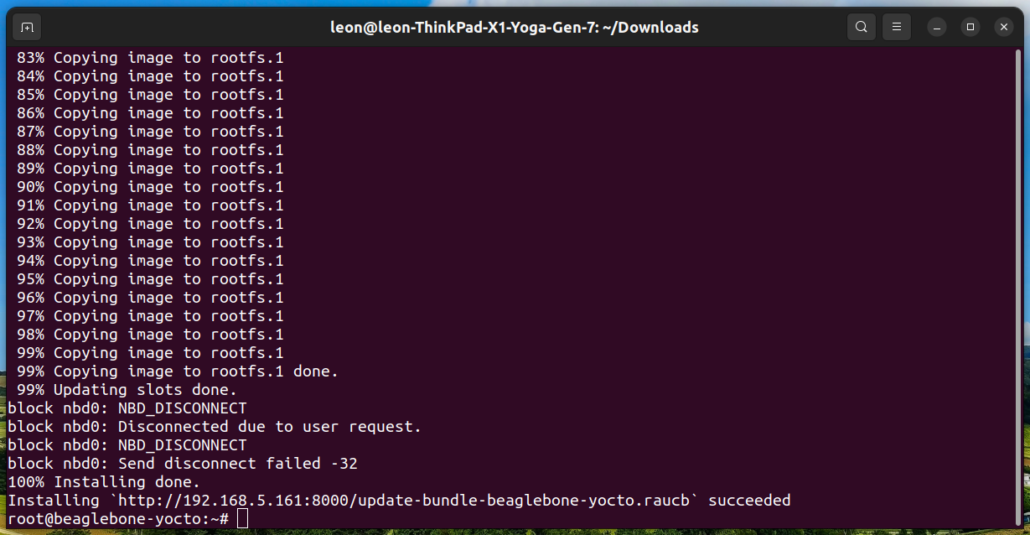
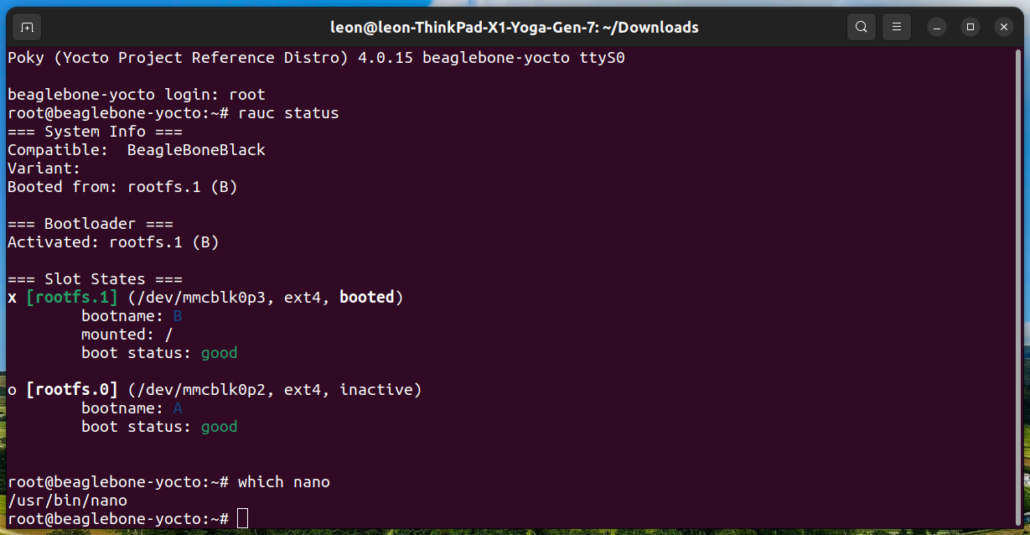
  • After the update is finished, the board will automatically restart. You can verify that the active RAUC rootfs slot has been updated and nano is present:
  • To optionally verify the update of the embedded Linux device from the cloud service, select Devices, click on olimex-imx8mp-evb, navigate to the Logs tab, and review the logs related to the RAUC update.

With qbee.io, multiple IoT devices can be grouped together and managed as a fleet from the cloud service. In practical product development scenarios, enhancing the Yocto Project and OpenEmbedded workflow can be achieved through a few straightforward commands to streamline continuous integration (CI).

The second part of the article will detail the exact steps to build, boot, and update an image on the Olimex iMX8MP-SOM-4GB-IND and iMX8MP-SOM-EVB-IND hardware, this time using Mender instead of RAUC, with the Yocto Project release 5.0 LTS (scarthgap).

Konsulko engineers have played pivotal roles as contributors and mentors in the commercial product space from the early days of OpenEmbedded and the Yocto Project. Our team excels in utilizing RAUC, Mender, Swupdate and a range of other open-source tools to deliver comprehensive software update solutionsContact us to discuss your specific product requirements and discover how Konsulko engineers can improve your embedded Linux development projects.

Konsulko engineer speaks at AGL All Member Meeting in Berlin

Scott Murray, Principal Software Engineer at Konsulko Group presented at the summer Automotive Grade Linux AMM. Scott shared details around the work done the past few years to prepare AGL before it upgraded to the new Yocto Project long-term support release, Scarthgap, earlier this year.

Two technical talks about the Yocto Project at TuxCon 2024

TuxCon is an annual open-source conference held in Plovdiv, Bulgaria, aimed to promote the adoption of open-source hardware and software, and organized by passionate volunteers. Since the conference’s inception in 2014, Konsulko Group engineers have participated and supported this important local event.

The 2024 edition of TuxCon took place on May 11th and 12th at the Technical University of Sofia, Plovdiv branch, featuring presentations on various interesting topics. This edition featured a couple of talks (in Bulgarian) about the Yocto Project and OpenEmbedded.

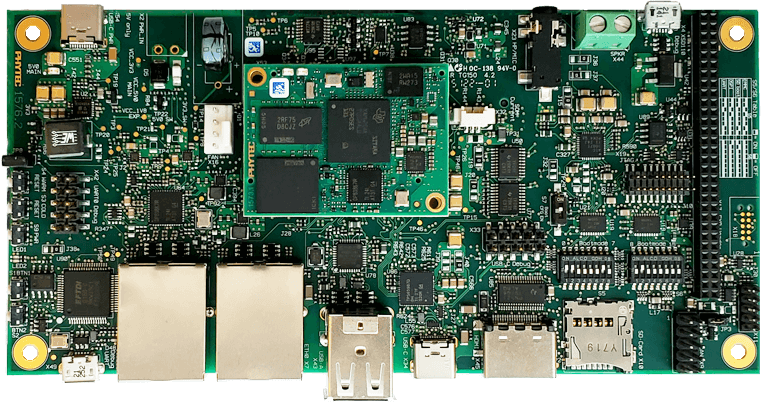
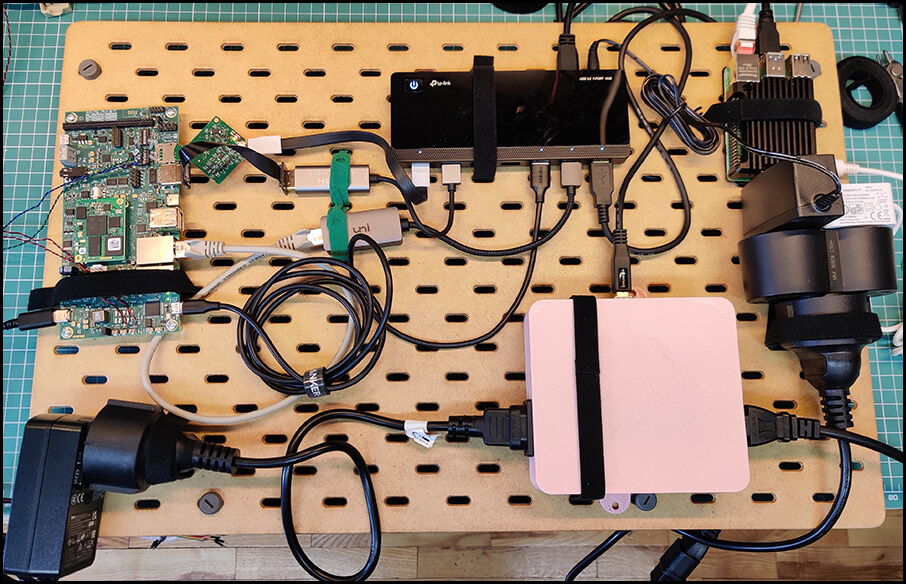
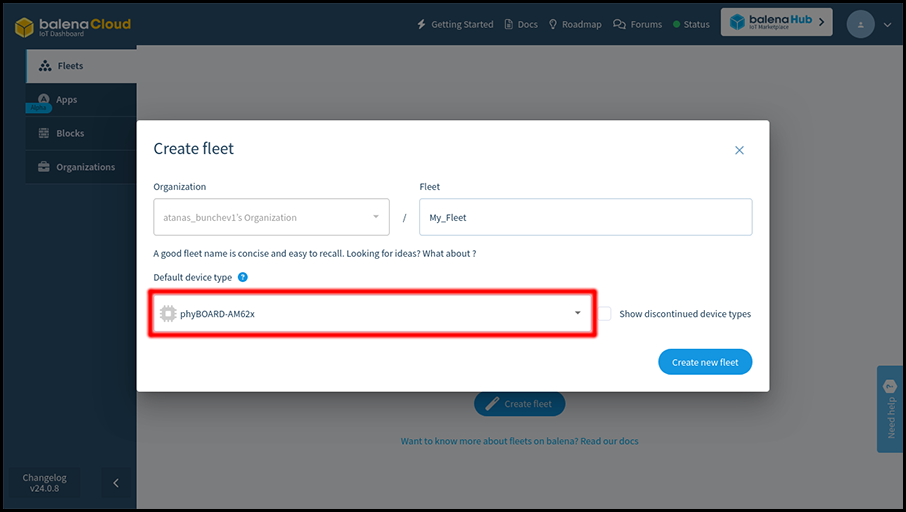
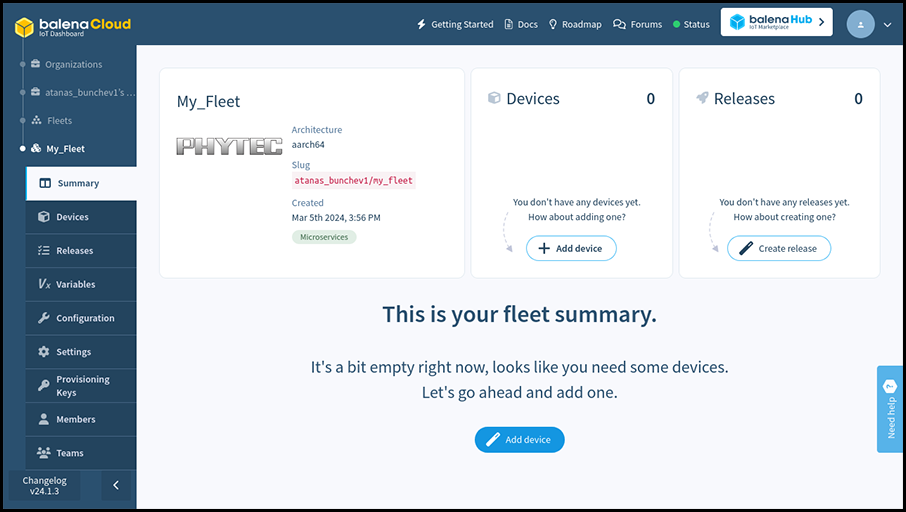
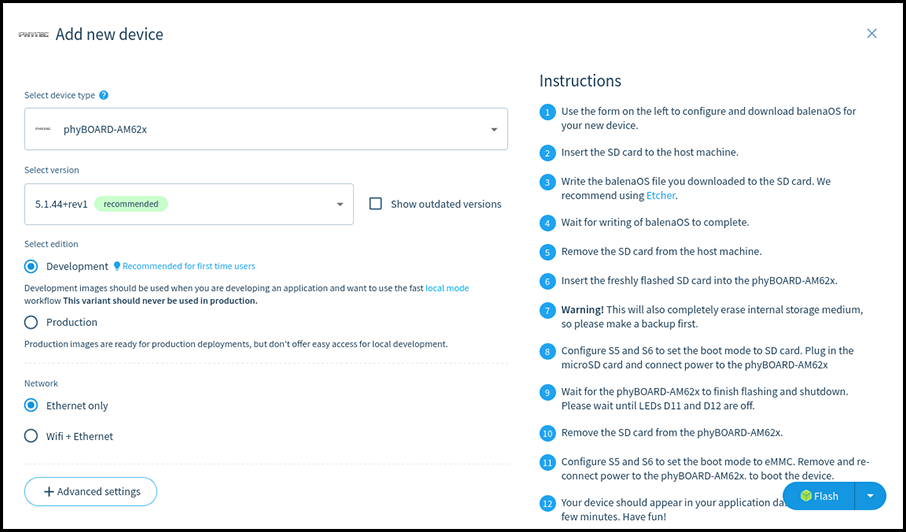
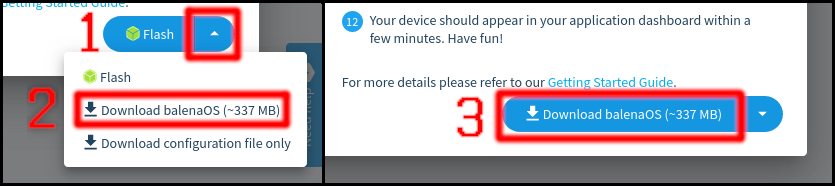
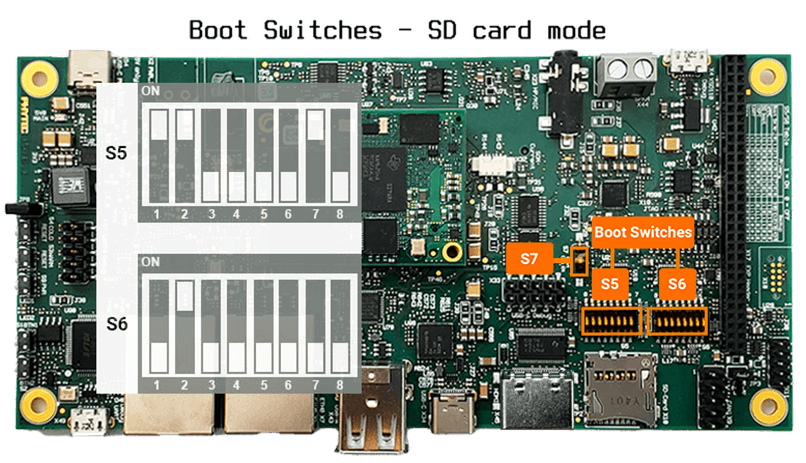
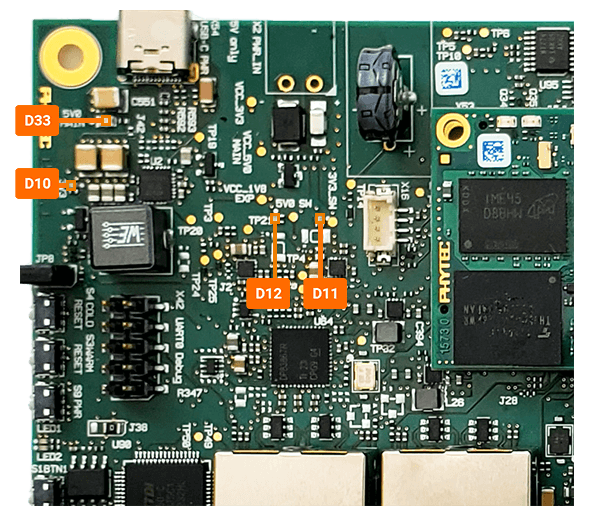
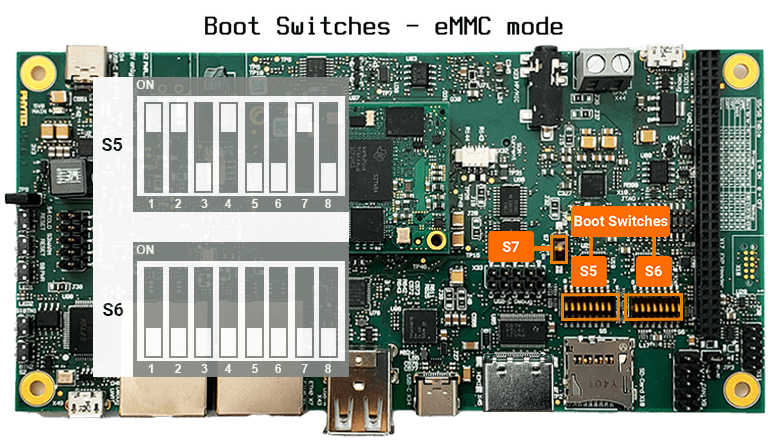
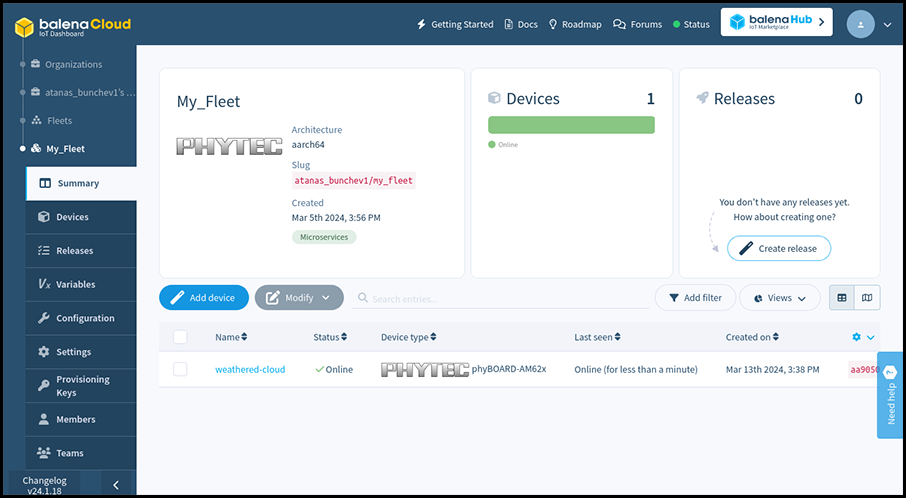
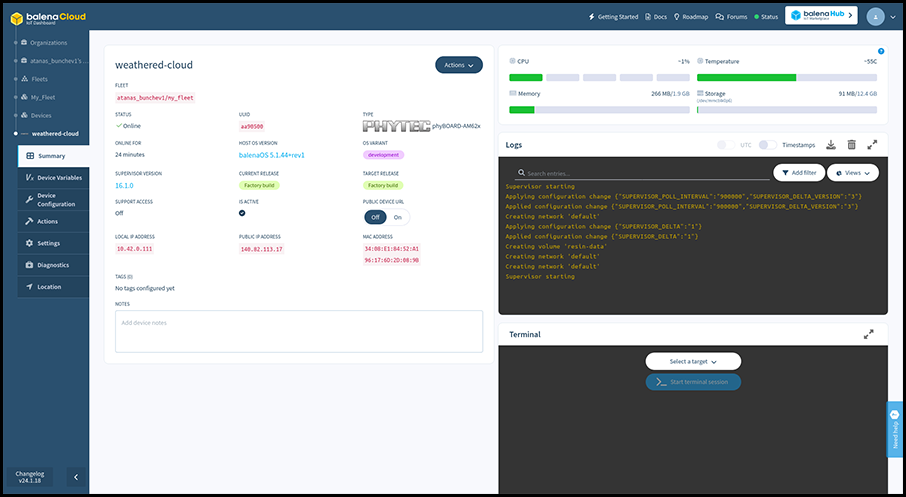
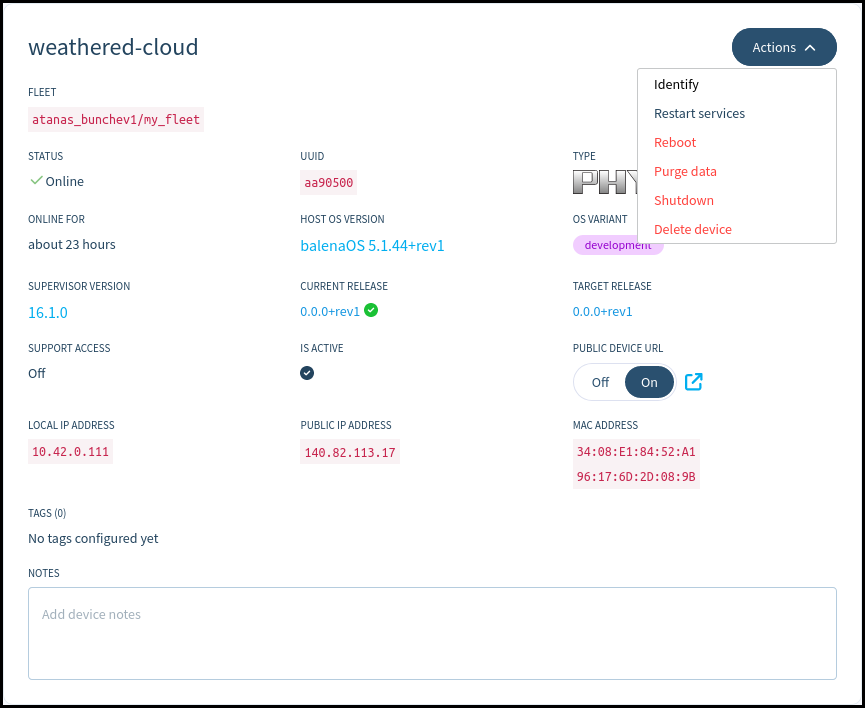
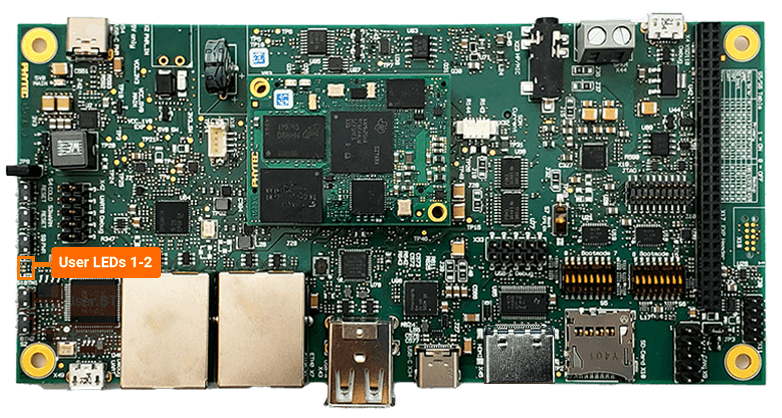
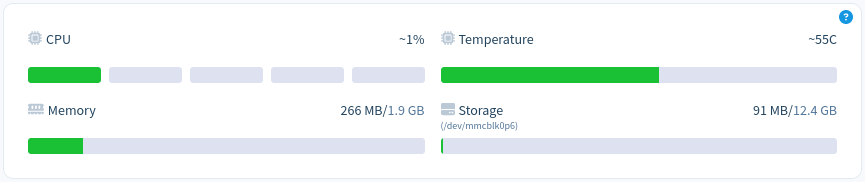
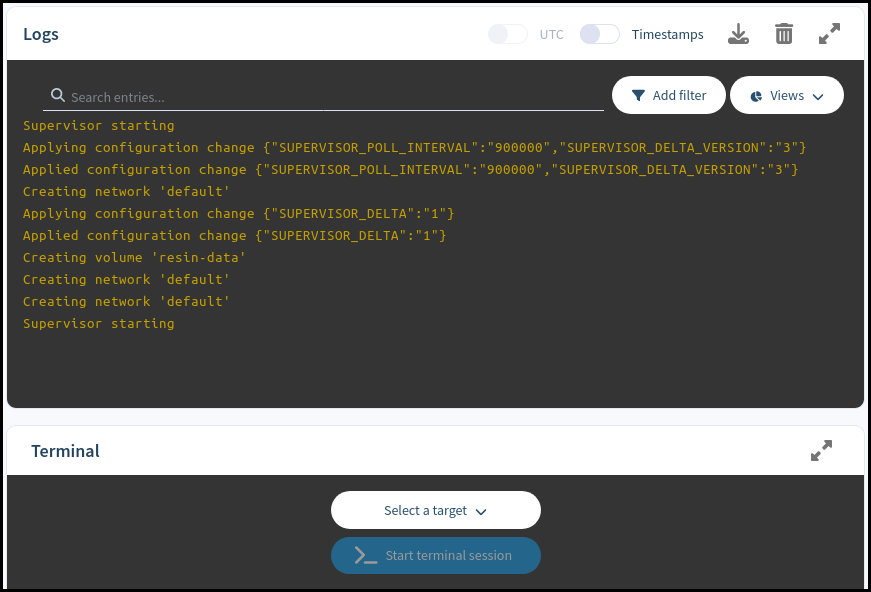
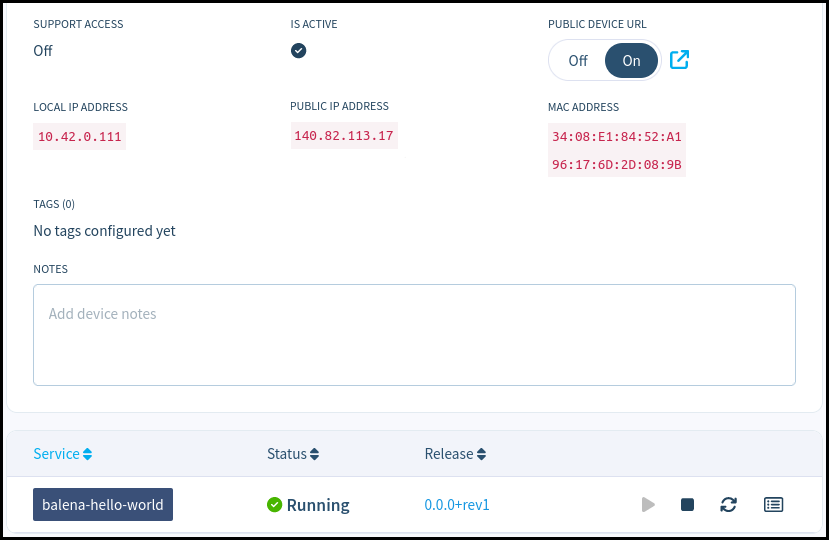
Konsulko Group junior engineer Atanas Bunchev spoke at the event, sharing his experience with Balena on Raspberry Pi and PHYTEC phyBOARD-AM62xBalena.io, commonly known as Balena, is a platform that simplifies the deployment and management of embedded Linux devices using images based on the Yocto Project and OpenEmbedded. It leverages Docker containers for streamlined application deployment across various Internet of Things (IoT), offers centralized device management for monitoring and updates, and supports scalability from prototypes to large-scale projects. Atanas further elaborated on the utilization of Balena AutoKit for conducting automated QA testing on embedded Linux devices.

The second talk about the Yocto Project at TuxCon 2024 was delivered by Sadika Hasan, a senior-year student from “Paisii Hilendarski” University of Plovdiv. She demonstrated how to create a custom Linux distribution and Software Development Kit (SDK) by extending Poky, the Yocto Project’s reference distribution. Additionally, she covered the integration of the custom SDK with Visual Studio Code and the remote debugging of a C++ application on a Raspberry Pi Zero W 2.

Sadika’s presentation is part of her bachelor thesis, supervised by Professor Dimitar Tokmakov from ECIT (Electronics and Information and Communication Technology) department of “Paisii Hilendarski” University of Plovdiv and Konsulko engineer Leon Anavi.

Professor Tokmakov, with the assistance of engineer Nikolay Nedelev from Romit LTD, is actively involved in the ECOVEM project (European Center of Vocational Excellence in Microelectronics). As part of their efforts, two students from PU developed diploma theses for their Bachelor of Science degrees utilizing the Yocto Project. These theses were based on real-life problem solving and the practical experience of the Konsulko Group with industrial embedded Linux devices.


From the early days of OpenEmbedded and the Yocto Project, Konsulko engineers have actively contributed upstream and engaged with the community, offering their expertise in developing high-quality commercial products. If you are developing a new product, get in touch to see how Konsulko’s engineering expertise can enhance your project. Additionally, if you are a Linux software developer passionate about open source, we invite you to explore potential opportunities to join the Konsulko team.

Porting Mender to Raspberry Pi 5 and Yocto Project Scarthgap

Overview

Mender is an open-source over-the-air (OTA) software update technology for embedded Linux devices and Internet of Things (IoT) ecosystem. It allows developers to remotely manage and update software on embedded Linux devices, ensuring that they remain secure, up-to-date, and functional throughout their lifecycle. Mender simplifies the process of launching a new project by offering official and community-supported board integrations for a wide range of devices and operating systems. These integrations include support for Debian family and the Yocto Project, making it easier for developers to get started with their projects seamlessly.

The Yocto Project is an open-source collaboration project by the Linux Foundation to create custom Linux-based systems for embedded devices. It uses the OpenEmbedded build automation framework with the build tool bitbake and provides Poky as a reference Linux distribution. The Yocto Project follows a regular release cycle, typically with a new version every six months, alongside long-term supported releases available every two years. Currently, the most recent LTS release is version 5.0, codenamed Scarthgap, which became available on April 30, 2024.

Recently, Senior Engineer Leon Anavi from Konsulko Group ported Mender to Raspberry Pi 5. This effort builds upon his previous contributions, where he added Raspberry Pi 5 support to the Yocto Project BSP (Board Support Package) layer meta-raspberrypi. This progress was made possible through sponsorship from the computer emergency response team of the Government of the Grand Duchy of Luxembourg (GOVCERT.LU). If you’re considering using Mender on Raspberry Pi or any other hardware platform for your embedded product needs, feel free to reach out to us to discuss further.

Raspberry Pi 5 introduces significant hardware differences compared to its predecessors. To enable Mender updates on this platform, we require U-Boot version v2024.04 or later. Unfortunately, the Yocto Project release Scarphgap ships with U-Boot version v2024.01, which isn’t compatible. To address this compatibility issue and obtain the necessary U-Boot version, our setup utilizes the scarthgap/u-boot branch from the meta-lts-mixins layer. Tim Orling, Principal Software Engineer at Konsulko Group, contributed the patches in meta-lts-mixins for U-Boot v2024.04.

Raspberry Pi 5 is the first model of the famous single board computers that features a dedicated UART connector is a three-pin header compatible with the Raspberry Pi Debug Connector specification. It can be used with Raspberry Pi Debug Probe, a USB device that provides both a UART serial port and a standard Arm Serial Wire Debug (SWD) interface.

The article offers a practical guide, outlining the exact steps to build a Mender-enabled image for Raspberry Pi 5 and execute an A/B update. To streamline the build setup, we’ll utilize KAS. This Python-based open-source tool effectively handles various Yocto/OpenEmbedded layers. KAS executes builds within a Docker container to ensure consistency and reliable build outcomes, regardless of the primary GNU/Linux distribution on the build machine.

Image for Raspberry Pi 5

Follow the steps below to build core-image-minimal with Mender for Raspberry Pi 5:

  • Install the kas tool (optionally, you can install globally for all users. Run as root, respectively under sudo then):
pip install kas
  • Clone this repository:
git clone -b scarthgap https://github.com/mendersoftware/meta-mender-community
  • Create a build directory and change into it:
mkdir -p meta-mender-community/mender-rpi5 && cd meta-mender-community/mender-rpi5
  • Use kas to build for the Raspberry Pi 5:
kas build ../kas/raspberrypi5.yml
  • Flash tmp/deploy/images/raspberrypi5/core-image-minimal-raspberrypi5.sdimg to a microSD card and boot it on Raspberry Pi 5.

Mender Artifact for Raspberry Pi 5

Follow the steps below to build a Mender Artifact for Raspberry Pi 5 that provides the simple text editor nano:

  • Enter KAS shell:
kas shell ../kas/raspberrypi5.yml
  • Append to the end of conf/local.conf:
IMAGE_INSTALL:append = " nano"
  • Build both core-image-minimal and a Mender Artifact for it:
bitbake core-image-minimal
  • As a result Mender Artifact containg nano will be generated as file tmp/deploy/images/raspberrypi5/core-image-minimal-raspberrypi5.mender

Update Raspberry Pi 5

As an end to end update solution, Mender provides aserver as the central hub for storing and orchestrating software updates across fleets of devices through over-the-air deployment. Through Mender’s user-friendly web UI or REST APIs, you can easily oversee device management, upload software releases, and create seamless deployments to distribute updates to your devices. However, it is also possible to use Mender in standalone mode without a server.

Follow the steps below to manually perform a standalone deployment with Mender in the terminal. In this scenario, no Mender Server is utilized, and the deployments are triggered directly at the device.

  • Start a simple HTTP server in the directory with the Mender Artifact:
python3 -m http.server
  • Login as root on Raspberry Pi 5 and install the Mender Artifact to perform an upgrade of the device:
mender-update install http://<server>:8000/core-image-minimal-raspberrypi5.mender

NOTE: Replace <server> with the IP address of the machine on which the Python3 HTTP server is running.

  • Reboot Raspberry Pi 5:
reboot
  • Login as root on Raspberry Pi 5 and verify that nano text editor has been installed.
  • Make the deployment permanent:
mender-update commit

This straightforward example showcases the seamless integration of Mender with Raspberry Pi 5 using the Yocto Project release Scarthgap. You can follow up and manage updates of fleets of Raspberry Pi 5 devices through the Mender server. Additionally, Mender offers convenient add-ons for remote troubleshooting, ensuring smooth operations in the field.


Since the earliest days of the OpenEmbedded build framework and the Yocto Project, Konsulko engineers have been active contributors to the community, aiding customers in crafting commercial products using these technologies. Our expertise extends beyond Mender, encompassing various open-source solutions for software updates. Feel free to get in touch to explore how we can assist with your embedded product requirements.

Konsulko Group speaks at EOSS North America 2024 in Seattle

Vitaly Wool and Tim Orling, both Principal Software Engineers at Konsulko Group are presenting at the Embedded Open Source Summit (EOSS) North America in Seattle Washington, April 15-18, 2024.

EOSS (which incorporates the Embedded Linux Conference) is an umbrella event for open source embedded projects and developer communities to come together under one roof for important collaboration, discussions and education.

Vitaly Wool

Vitaly, who is also general manager of Konsulko AB in Lund, Sweden, will give a technical talk on “Rusty Swapping: Rewriting a zswap Backend in Rust.”

Rust has gained popularity as the “second” Linux kernel high-level language. There’s been discussions about its applicability in various kernel subsystems which yielded tentative conclusions. Engineers have been advised by kernel gurus to use Rust for subsystem implementations rather than for drivers.

Vitaly will explain how he rewrote a zswap backend called zblock in Rust, then compare the performance and complexity of the two implementations.

Tim Orling

Tim, who serves on the board of directors of OpenEmbedded, will speak at the Yocto Project half-day mini-summit “Journey to Scarthgap 5.0” on Monday, April 15. With other YP community leaders, he will deep dive into upcoming features and improvements in the upcoming LTS release.

The rest of the week, you may find Tim in and around the Yocto Project booth in the exhibition hall. Please stop by with all your Yocto questions.

Tag Archive for: open source