Maintaining a Community BSP Layer: Updating Meta-Tegra [slides]
Tim Orling, Konsulko Group & Ilies Chergui, Medtronic
EOSS June 2023
Tim Orling, Konsulko Group & Ilies Chergui, Medtronic
EOSS June 2023
Tim Orling (Konsulko) and Eilís ‘pidge’ Ní Fhlannagáin (BayLibre)
YPDD 2023
Held on June 10th and 11th, 2023 in the beautiful city of Plovdiv (Bulgaria), TuxCon 2023 marked the 10th anniversary of this annual local two-day conference. Organized by dedicated volunteers, the event aims to advocate the adoption of open source hardware and foster the use of free and open source software.
Konsulko Group intern Atanas Bunchev participated as a speaker, and demonstrated remote updates and troubleshooting of connected embedded Linux devices using Mender.io. The presentation was in Bulgarian and spread the word about the Yocto Project, OpenEmbedded and various Mender features among the local community.
Mender is an open-source, over-the-air (OTA) software update management platform specifically designed for embedded devices. It provides an efficient way for software updates and management of fleets of connected devices in various industries, such as IoT (Internet of Things), automotive, industrial automation, and healthcare. It provides options for ensuring the resilience of system-wide updates and also for updating individual applications. Furthermore debugging of devices is possible with the troubleshooting package, such as the File Transfer and Remote Terminal Add-ons.
Konsulko Group, a partner of Northern.tech, often works with Mender.io. If you are developing a new product, we would be thrilled to discuss how Konsulko’s engineering expertise and experience can contribute to your project. Or if you are a Linux software developer who is passionate about open source, we invite you to reach out to us regarding potential opportunities to join the Konsulko team.
Konsulko engineers will be giving two talks at Embedded Open Source Summit (EOSS), a new Linux Foundation umbrella event held in Prague, Czech Republic, June 27-30, 2023. Attending virtually is also an option. Incorporated into EOSS are the Embedded Linux Conference (ELC) and the Automotive Linux Summit Europe (ALS).
On Tuesday, June 27, Konsulko Principal Engineer Scott Murray will present a Lightning Talk: Vehicle Signal Specification and KUKSA.val Updates in AGL at ALS.
The Vehicle Signal Specification (VSS) has been included in the AGL UCB by incorporating the KUKSA.val project. Scott will provide an update on the work done for the upcoming Prickly Pike UCB release.
On Thursday, June 29 at ELC, Tim Orling, Konsulko Principal Engineer and Ilies Chergui of Medtronic will speak about Maintaining a Community BSP Layer: Updating Meta-Tegra Through Major Changes.
The meta-tegra BSP layer supports the NVIDIA Jetson family of systems-on-module and has an active OpenEmbedded for Tegra community. Tim and Ilies will discuss changes in the latest SDKs including the bootloader and the trusted OS, and how these affect secure boot and disk encryption implementations. They will also discuss changes needed to support over the air updates and cover how the community keeps up with upstream Open Embedded/Yocto Project changes, as well as the roadmap for support for future Jetson platforms and Yocto Project releases.
Please join Scott, Tim, and a good-sized contingent of our engineers in Prague (or virtually). Register here.
Scott Murray
AGL AMM Berlin 2023
(This article was written by open source software enthusiast and Konsulko Group intern Atanas Bunchev, working with Konsulko Senior Engineer Leon Anavi.)
Konsulko Group often works with Mender.io to provide secure, risk tolerant and efficient Over-The-Air updates for any software on an embedded device. This includes both solutions for robust system updates as well as updates of single applications. Mender is compatible with any Linux based OS, including popular build systems such as Yocto Project/OpenEmbedded, Buildroot and OpenWrt.
Aside from OTA updates Mender also offers several add-ons. These are optional extensions that provide functionality for use cases beyond the core OTA updates features.
One such use case is remote troubleshooting. In practice deployed devices in the field are often hard to reach or retrieve. Troubleshooting individual devices becomes resource inefficient and in some cases they have to be replaced even when it’s just a small software or configuration issue. Our experience has shown in these situations Mender’s Add-ons have proven to be extremely useful.
This article provides as an example, the exact steps how to integrate Mender with The Yocto Project and OpenEmbedded for SolidRun CuBox-I and HummingBoard as well as a demonstration of the Mender Troubleshooting package, more specifically the File Transfer and Remote Terminal Add-ons. With the File Transfer add-on files can be downloaded and uploaded to any accepted device. Remote Terminal add-on allows remote interactive command execution from the Mender UI.
These add-ons are very valuable for system administration and mantainance of Internet of Things or fleets of connected industrial devices. For an example, we will troubleshoot an embedded Linux device remotely with systemd using Mender add-ons. We will upload tools to gather system boot-up performance statistics, run them on the device thanks to the Remote Terminal and download logs for further debugging.
Any Mender enabled device is suitable for this demonstration. Recently the Konsulko Senior Engineer Leon Anavi ported Mender to SolidRun CuBox-I and HummingBoard with NXP i.MX6 SoC so our current setup is based on this hardware platform and Yocto LTS release Kirkstone. Earlier we also ported RAUC, an alternative free and open source OTA update platform to the same hardware. If you are interested in software updates, please contact us to discuss your own embedded product needs in details. The hardware used in this example is:
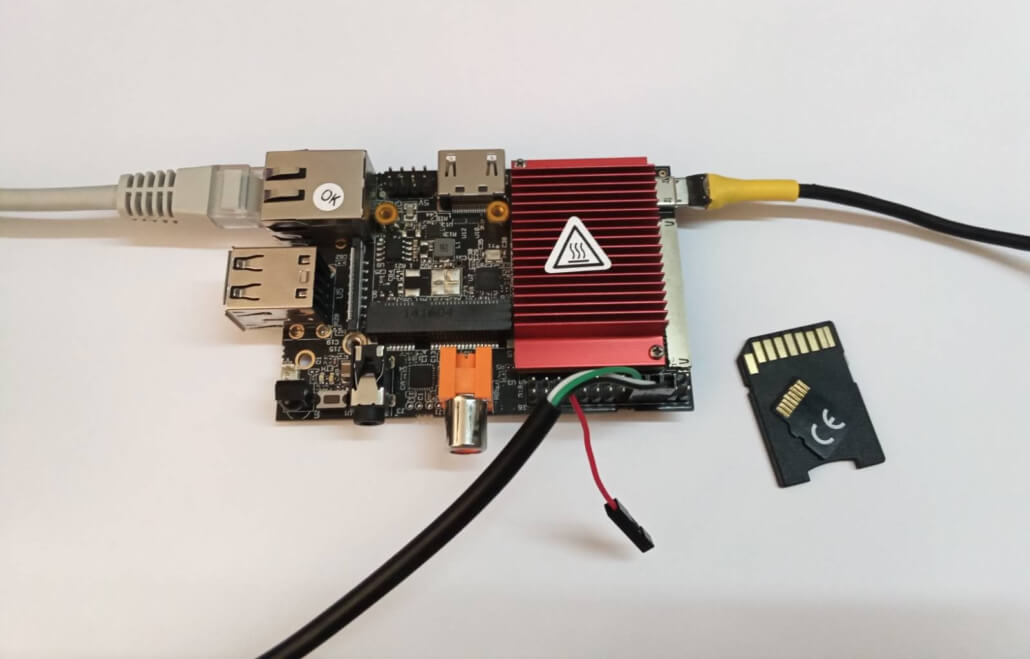
The Mender Community provides a set of examples for integration with various hardware platforms using Yocto/OpenEmbedded in the meta-mender-community repository. Sub-layer meta-mender-nxp in this repository contains the integration for Cubox-I/HummingBoard.
The meta-mender-nxp layer uses Google Repo to provide easy and simple setup and build process for the examples:
$ mkdir mender-nxp && cd mender-nxp
$ repo init -u https://github.com/mendersoftware/meta-mender-community \
            -m meta-mender-nxp/scripts/manifest-nxp.xml \
            -b kirkstone
$ repo sync
$ source setup-environment nxpTo configure the build system we have to append to conf/local.conf inside the build directory.
First we are going to set the build target machine:
MACHINE = "cubox-i"Then we have to accept the end user agreement required by the BSP layer:
ACCEPT_FSL_EULA = "1"Note: Usually to enable Mender’s Troubleshooting features we have to add mender-connect to IMAGE_INSTALL. In our case this is already added by the meta-mender-demo layer.
We have to provide our device with MENDER_SERVER_URL and MENDER_TENANT_TOKEN.
For that reason we have to register at https://mender.io/.
Mender provides a free demo profile with limitation of 1 year and up to 10 devices which can be used to experiment with all of Mender’s features.
In fact, when sourcing the setup-environment script we get most of the mender-specific configuration appended to local.conf. This includes a description of how to get our tenant token:
# Build for Hosted Mender
#
# To get your tenant token:
#    - log in to https://hosted.mender.io
#    - click your email at the top right and then "My organization"
#    - press the "COPY TO CLIPBOARD"
#    - assign content of clipboard to MENDER_TENANT_TOKEN
#
#MENDER_SERVER_URL = "https://hosted.mender.io"
#MENDER_TENANT_TOKEN = ""
Note: If using the European server one has to set MENDER_SERVER_URL = "https://eu.hosted.mender.io"
Once we assign our tenant token and remove the # in front of MENDER_SERVER_URL and MENDER_TENANT_TOKEN we’re ready to build our system.
Build an example image with Yocto:
$ bitbake core-image-baseBuilding an image from scratch is a long process involving a lot of tasks. Please patiently wait until bitbake completes all tasks.
Once the build is complete flash the image to the microSD card (replace /dev/sdX with the proper device path) and boot it on the HummingBoard:
$ bmaptool copy tmp/deploy/images/cubox-i/core-image-base-cubox-i.sdimg.bz2 /dev/sdX
$ sync
$ eject /dev/sdXOnce the board finishes booting it will poll the Mender server. By design the connection has to be established from the board to the server. Mender does not open any ports on the board to provide better security therefore the device has to initiate the connection.
When the connection is established the Mender control panel will indicate one pending device.
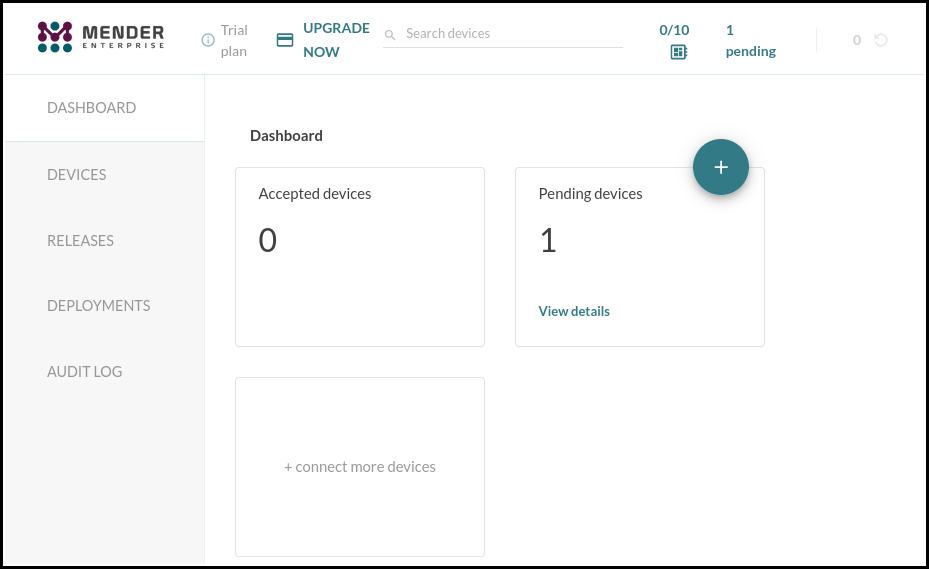
To accept the request click on View details under Pending devices.
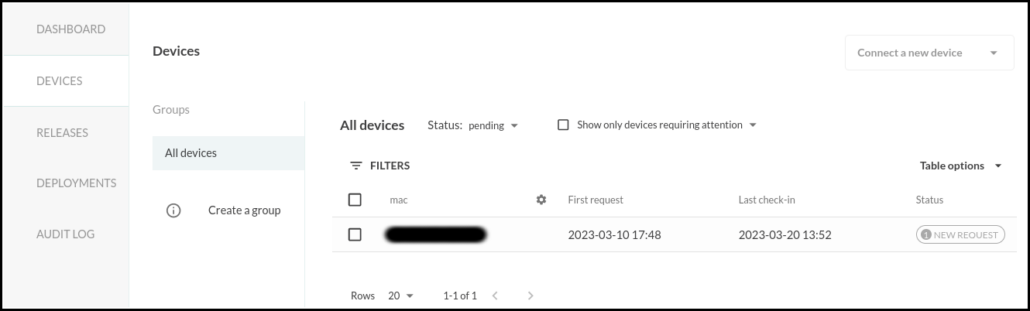
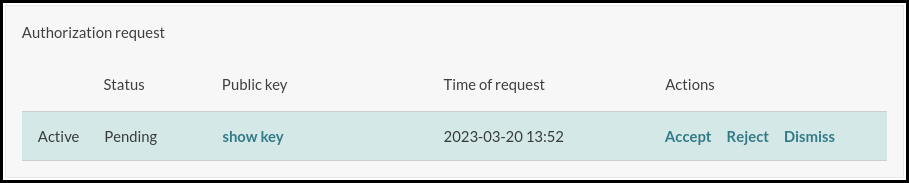
Select the new device and press accept in the Authorization request section.
Once the connection is accepted head over to the Troubleshooting tab in the Device information section. Here you can launch a remote terminal and transfer files.
The next part of the article will demonstrate preparing, uploading and using systemd-analyze to fetch data about the boot process.
To compile systemd-analyze we have to add it to our image in conf/local.conf:
IMAGE_INSTALL:append = " systemd-analyze"Rebuild systemd to get the systemd-analyze binary:
$ bitbake systemd -c compileWhen using the do_compile command Yocto/OpenEmbedded will preserve the compiled binaries.Find the systemd-analyze binary and libsystemd-shared-<version>.so shared library:
$ find tmp/work -name "systemd-analyze"
$ find tmp/work -name "libsystemd-shared*.so"
Note: As of the time of writing of this article these files should reside in locations similar to ./tmp/work/cortexa9t2hf-neon-poky-linux-gnueabi/systemd/1_250.5-r0/build/systemd-analyze and ./tmp/work/cortexa9t2hf-neon-poky-linux-gnueabi/systemd/1_250.5-r0/build/src/shared/libsystemd-shared-250.so. These paths depend on the exact version of systemd as well as the build configuration and may not be correct in your case.
Upload these files to the board using Mender’s File Transfer utility:
systemd-analyze into /usr/bin/libsystemd-shared-<version>.so into /usr/lib/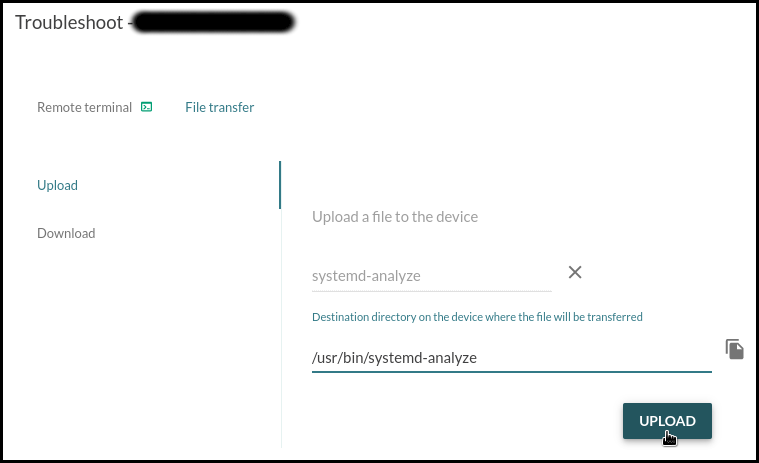
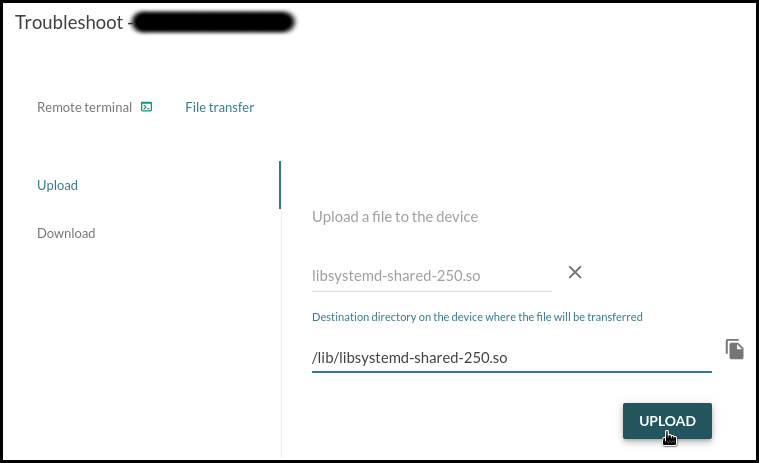
Once the troubleshooting software is uploaded we can use the Remote Terminal to execute it.
Permit execution of the systemd-analyze binary:
# chmod +x /usr/bin/systemd-analyzeCheck the time it took for the system to initialize:
# systemd-analyzeExport a graphic of all enabled services and the time they took to initialize:
# systemd-analyze plot > init.svg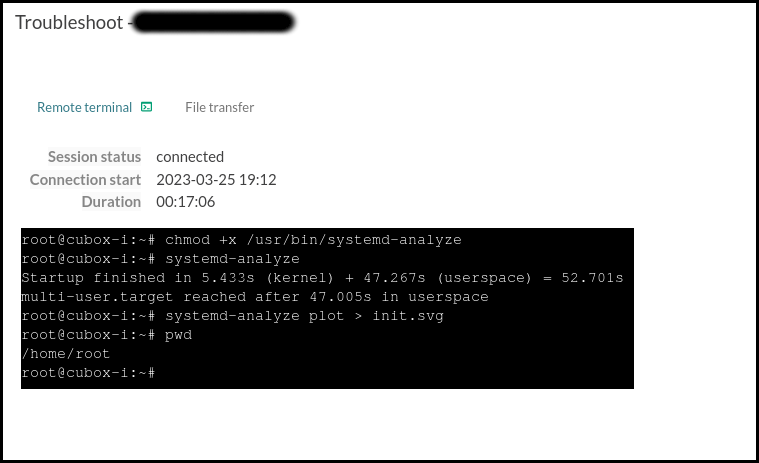
Download init.svg:
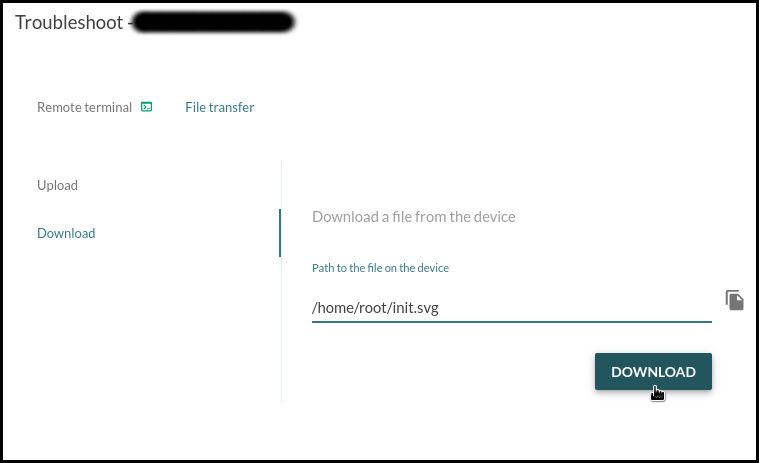
This graphic shows that the device needs around a minute to reach multi-user.target. The longest task is the resizing of the /data partition that runs on first boot and the second longest is the filesystem check for mmcblk1p1 that runs every time the system boots.

Here is another graphic generated after a reboot:

This article demonstrates how to use Mender’s Remote terminal and File Transfer troubleshooting utilities to upload and execute the systemd-analyze binary to profile the initialization process of systemd services. These troubleshooting utilities can be used for variety of different tasks. After debugging a single device and finding an appropriate fix, Mender is capable of performing an A/B or delta software update to all devices or specific group of devices in the field.
Since the earliest days of the OpenEmbedded build framework and the Yocto Project, Konsulko engineers have been contributing to the community and helping customers build commercial products with these technologies. We have experience with RAUC, Mender and other open source solutions for software updates. Please contact us to discuss your own embedded product needs.
Konsulko Group Principal Software Engineer, Scott Murray will present Vehicle Signaling Specification and KUKSA.val in AGL at the Automotive Grade Linux All Member Meeting in Berlin on Thursday, March 9, 2023.
The Vehicle Signaling Specification (VSS) is an emerging standard to define and categorize vehicle signals. AGL members who attend the session will receive a high-level overview of what VSS and the related Vehicle Information Service Specification (VISS) provide. This will be followed by a discussion of how the KUKSA.val VSS implementation has been integrated into the AGL demonstration stack.
The following week, Scott will be on hand at the AGL stand at Embedded World (Hall 4, Stand 4-171) in Nuremberg, March 14-16. He’ll be happy to talk about VSS, KUKSA.val and many other AGL technical topics. Please stop by if you are visiting the show.
(This article was written by open source software enthusiast and Konsulko Group intern Atanas Bunchev, working with Konsulko Senior Engineer Leon Anavi.)
RAUC is one of the popular solutions that provide OTA (over-the-air) updates for Embedded Linux devices. RAUC is developed with focus on stability, security and flexibility and is compatible with all popular build systems: The Yocto Project/OpenEmbedded, Buildroot and PTXdist.
RAUC is capable of covering various use cases the most simple one being A/B updates.
The A/B updates scenario consists of having 2 identical root filesystems (named A and B), booting from one of them and performing the update on the other. After the update is complete the bootloader will boot from the updated partition on the next system boot. Recently the ‘verity’ update bundle format was introduced in RAUC. This new groundbreaking feature improves the verification process and most importantly allows extending RAUC by built-in HTTP(S) network streaming support, adaptive delta-like updates, and full update bundle encryption.
This article provides an example for setting up RAUC for A/B updates scenario on a HummingBoard board. The hardware used for the example is:
RAUC is a robust, powerful and flexible open source solution that requires advanced skills for initial integration. To use RAUC in an image built with the Yocto Project and OpenEmbedded for CuBox-I/HummingBoard one needs to:
I’ve recently contributed to meta-rauc-community, a repository containing minimal RAUC example layers for Yocto/OpenEmbedded.
The following steps will show how to use the meta-rauc-nxp layer from that repository to build and update a minimal Linux distribution. The update will install nano (the text editor) to the system.
Download the reference Yocto distribution, Poky.
We’ll use the latest long term support version, kirkstone.
$ git clone -b kirkstone https://git.yoctoproject.org/poky
$ cd poky
Download meta-rauc-community layers (meta-rauc-nxp):
$ git clone https://github.com/rauc/meta-rauc-community.git
Download the meta-rauc layer:
$ git clone -b kirkstone https://github.com/rauc/meta-rauc.git
Download the BSP layers for cubox-i/HumminbBoard boards:
$ git clone -b kirkstone https://git.yoctoproject.org/meta-freescale
$ git clone -b kirkstone https://github.com/Freescale/meta-fsl-arm-extra.git
Download the meta-openembedded layer (provides nano):
$ git clone -b kirkstone git://git.openembedded.org/meta-openembedded
Initialize the build environment:
$ source oe-init-build-envAdd the layers to conf/bblayers.conf:
$ bitbake-layers add-layer ../meta-openembedded/meta-oe
$ bitbake-layers add-layer ../meta-rauc
$ bitbake-layers add-layer ../meta-freescale
$ bitbake-layers add-layer ../meta-fsl-arm-extra
$ bitbake-layers add-layer ../meta-rauc-community/meta-rauc-nxp
Adjust conf/local.conf by adding the following configurations to the end of the file:
# HummingBoard specifications are very similar to Cubox-I
MACHINE = "cubox-i"

# Accept end user agreement required by the BSP layer.
ACCEPT_FSL_EULA = "1"

# Use systemd as init manager
INIT_MANAGER = "systemd"

# Add RAUC to the image
IMAGE_INSTALL:append = " rauc"
DISTRO_FEATURES:append = " rauc"

# Generate ext4 image of the filesystem
IMAGE_FSTYPES:append = " ext4"

# Use the file containing the partition table specification
WKS_FILE = "sdimage-dual-cubox-i.wks.in"
WKS_FILES:prepend = "sdimage-dual-cubox-i.wks.in "

# Add 150 000 KBytes free space to the root filesystem
# (Adding software with updates require space.)
IMAGE_ROOTFS_EXTRA_SPACE:append = " + 150000"

# Add the boot script to the boot partition
IMAGE_BOOT_FILES:append = " boot.scr"
Note that whitespace inside quotes is intentional and important.
To sign and verify the update bundles RAUC uses SSL keys. A keyring containing all keys that will be used for update bundles needs to be installed on the target.
meta-rauc-community provides a script that would generate example keys and configure the current build environment accordingly. (The script has to be called after sourcing oe-init-build-env)
$ ../meta-rauc-community/create-example-keys.sh
Build a minimal bootable image:
$ bitbake core-image-minimal
Building an image from scratch is a long process involving a lot of tasks. Please patiently wait until bitbake completes all tasks.
It’s strongly recommended to zero-fill the u-boot environment sectors before flashing the image on the microSD card (replace /dev/sdX with the proper device path):
$ dd if=/dev/zero of=/dev/sdX seek=2032 count=16
After the build is done, flash the image to a microSD card (replace /dev/sdX with the proper device path) and boot it on the HummingBoard:
$ bmaptool copy tmp/deploy/images/cubox-i/core-image-minimal-cubox-i.wic.gz /dev/sdX
$ sync
$ eject /dev/sdX
Attach the USB-to-UART adapter to the HummingBoard Pro, plug the ethernet cable and the microSD card. Turn on the board to verify that the system boots successfully.
By default one can login as root without password.
After sourcing the oe-init-build-env, append the following line to the build configuration conf/local.conf to add nano to the system:
# Adding nano
IMAGE_INSTALL:append = " nano"
Build the RAUC update bundle:
$ bitbake update-bundle
Start a web server:
$ cd tmp/deploy/images/cubox-i/
$ pip3 install --user rangehttpserver
$ python3 -m RangeHTTPServer
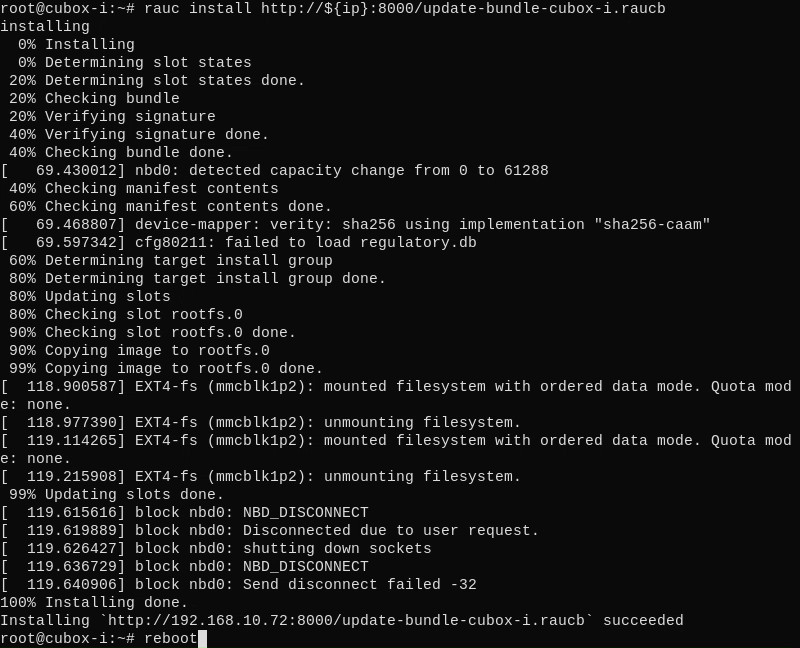
Now you can install the bundle on the board, then reboot:
# rauc install http://192.168.1.2:8000/update-bundle-cubox-i.raucb
# reboot
One of the latest RAUC features is the verity bundle format. This format allows updates to be done without storing the whole bundle on the device in advance, which is useful for devices with limited space. One of the requirements for this feature is hosting the bundle on a server that supports HTTP Range Requests.
As alternative, you can transfer the bundle to the device and install it from local storage.
Verify that nano was added to the system:
# which nano
Check RAUC status to confirm the system have booted from the second partition:
# rauc status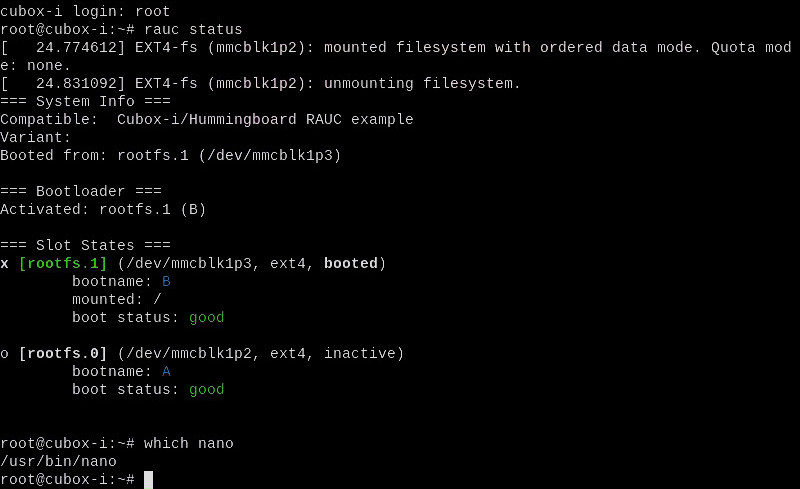
For real-world products, this build procedure with the Yocto Project and OpenEmbedded can be optimized further with just a few commands for easy implementation of continuous integration (CI).
Since the earliest days of the OpenEmbedded build framework and Yocto Project, Konsulko engineers have been contributing to the community and helping customers build commercial products with these technologies. We have experience with RAUC, Mender and other open source solutions for software updates. Please contact us to discuss your own embedded product development.
Taking place February 4 & 5, 2023 in the beautiful city of Brussels (Belgium), FOSDEM is a two-day event organized by volunteers to promote the widespread use of free and open source software.
This year, Konsulko Group senior software engineer Leon Anavi will present Ups and Downs with Remote Desktop Protocol (RDP) on Wayland, Weston and the Yocto Project.
Leon’s tutorial provides the exact steps to build-from-scratch core-image-weston, setup RDP and remotely access the embedded device using wlfreerdp (for Wayland) or xfreerdp (for X11) from a personal computer with Linux in the same network. Examples will be based on the kirkstone long-term support release of Yocto Project.
Leon will also discuss the advantages and the disadvantages of RDP as well as some troubleshooting guidelines.
If you are attending FOSDEM, be sure to to catch this lightning talk at the Embedded, Mobile and Automotive devroom on Saturday.
Leon Anavi
FOSDEM 2022