 © Konsulko Group
A Three-Month-Old Bug: Debugging an HDMI Hotplug Fault on TI AM62x
By Filipe Pires, Software Engineer at Konsulko Group
At Konsulko Group, we recently worked on HDMI support for a custom industrial product based on Texas Instruments’ AM62x SoC, using an Analog Devices ADV7511 HDMI bridge. The initial HDMI bring-up went smoothly, and we adapted the device tree from TI’s SK-AM62B-P1 reference design to our custom board. We later migrated the display stack from a legacy framebuffer setup to Wayland and Weston. Wayland is a display protocol that defines communication between applications and the compositor, while Weston is its reference compositor, responsible for managing windows, coordinating rendering, and presenting content on the display.
Everything seemed to be working fine until the customer requested dynamic resolution negotiation and HDMI hotplug detection. What initially looked like a straightforward feature request ended up uncovering a device tree bug that had existed since the original HDMI bring up three months earlier.
The task: stop hardcoding the resolution
Before this work, the display resolution was hardcoded using the video= kernel command line argument, so we weren’t relying on Extended Display Identification Data (EDID) to select the display mode. This worked fine during the initial bring up, but the customer now wanted the resolution to be negotiated automatically based on the connected display.
To support that, we needed to read the monitor’s EDID and handle hotplug events, so that connecting a different display would trigger a new mode detection without requiring a reboot.
The symptom: it works, but only the second time
The first problem we noticed was during boot. Weston would start at a fallback resolution instead of the display’s native resolution. However, restarting Weston manually after the system was up would result in a successful EDID read, and the correct display modes would appear.
We also noticed that unplugging and reconnecting the HDMI cable wasn’t reliably triggering a new mode detection. At that point, we weren’t sure whether the two problems were related.
This was our first clue. The hardware and software were exactly the same, yet restarting Weston was enough to get everything working. We suspected some sort of timing issue during startup, but we still needed to understand what was happening.
Into the driver
To understand why the EDID read was failing, we started looking into how the whole hotplug mechanism worked. This took us through the ADV7511 bridge driver, the Kernel DRM subsystem, and eventually Weston’s DRM backend.
Looking through the ADV7511 driver (drivers/gpu/drm/bridge/adv7511/), one thing that caught our attention was a comment explaining that some monitors pulse their Hot Plug Detect (HPD) signal when waking from standby.
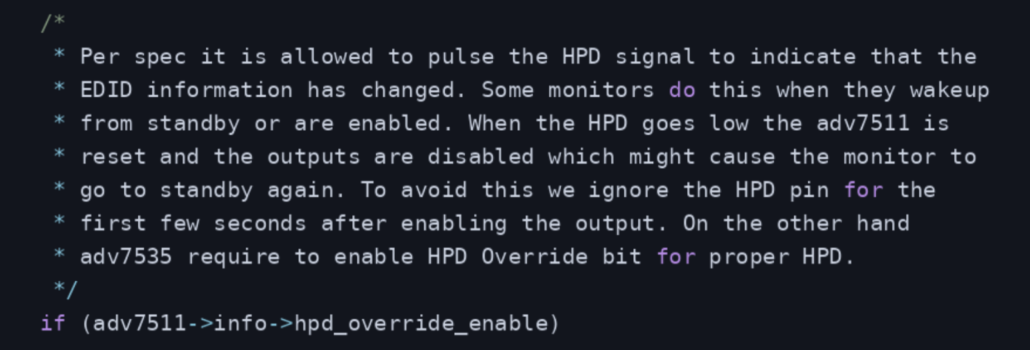
This seemed relevant to what we were seeing. On boot, the monitor might not be ready when the initial EDID read was attempted. By the time we restarted Weston, it had already finished waking up.
To test this theory, we added a small sleep before the EDID read. With that delay, the read succeeded reliably.
That was encouraging, but it wasn’t a proper fix. We couldn’t just introduce an arbitrary delay and expect it to work with every monitor. More importantly, we still needed to understand what was supposed to happen if the monitor became ready after the initial read had already failed.
Looking further into the driver, we found that adv7511_irq_process() handles the chip’s interrupt status, including HPD changes. When an HPD interrupt is detected, it schedules adv7511_hpd_work(), which checks the connector status and, if it has changed, notifies DRM through drm_kms_helper_hotplug_event().
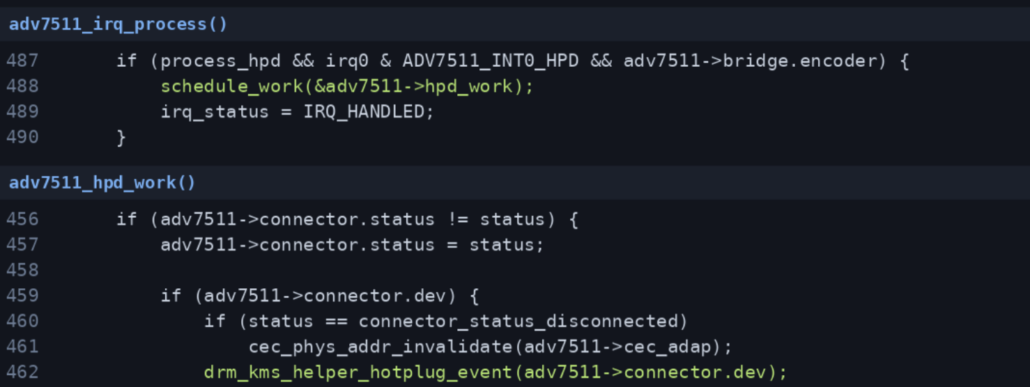
This helped us understand an important distinction: the interrupt doesn’t directly trigger an EDID read. Instead, it notifies the rest of the display stack that something has changed. The EDID is read separately through the connector’s mode probing path.
Following drm_kms_helper_hotplug_event() into the DRM core, we found that it eventually calls drm_sysfs_hotplug_event(), which generates a standard Linux uevent with HOTPLUG=1.
We then looked at how Weston handles these events. Its DRM backend registers a udev monitor, and when a hotplug event arrives, udev_drm_event() calls drm_backend_update_connectors(). This updates the connector information and allows Weston to discover the available display modes again.
By this point, we had a much better understanding of the complete path, from the ADV7511 hardware interrupt through the DRM subsystem and all the way to Weston.
With a better understanding of the hotplug mechanism, we started to suspect that the two issues might be connected. The sleep explained why waiting longer allowed EDID to be read successfully, but it couldn’t explain why hotplug events weren’t being handled correctly.
Both problems pointed us back to the hardware interrupt.
Was the ADV7511 interrupt actually reaching the kernel?
The real bug: two lines in the device tree
Following the interrupt path eventually brought us back to the device tree. We knew the ADV7511 driver was expecting an interrupt to notify DRM of a hotplug event, so we started checking how that interrupt was configured on our board.
That’s where we found the problem.
There were actually two issues in the device tree. First, the pad connected to the ADV7511 interrupt line was configured as an output instead of an input. Second, the interrupt properties in the ADV7511 node referenced the wrong GPIO controller and pin.
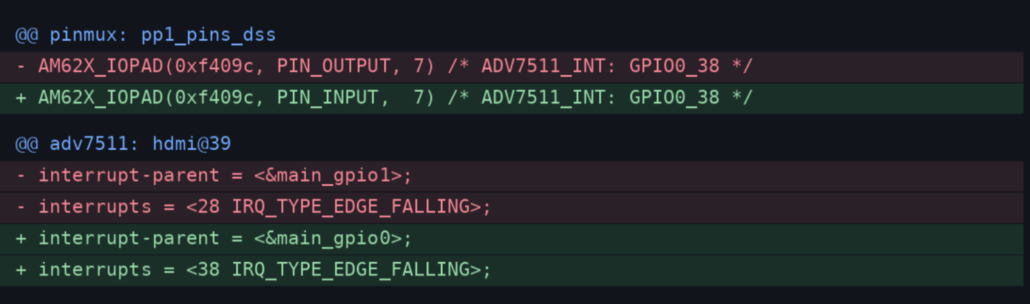
With this configuration, the interrupt could never reach the driver correctly. This explained why unplugging and reconnecting the HDMI cable wasn’t triggering hotplug detection.
It also explained why the sleep had appeared to fix the boot problem. The delay gave the monitor enough time to become ready before we attempted to read EDID, but it did nothing to fix the missing interrupt.
Once we corrected the pin direction and interrupt mapping, the hotplug mechanism worked as expected. The driver could receive the interrupt, DRM could notify userspace, and Weston could respond to changes in the connected display.
Retrospective
After fixing the issue, we checked the Git history and found that the incorrect configuration dated back to the original HDMI bring up, roughly three months earlier. HDMI output had worked with a hardcoded resolution, so the missing hotplug functionality had gone unnoticed through subsequent device tree changes.
The fix itself was small, but finding it meant tracing the path from the ADV7511 through DRM to Weston. The sleep experiment helped us understand the boot timing, but following the missing hotplug events was what finally led us to the device tree issue.
One lesson from this debugging effort is that getting a peripheral working during bring up doesn’t necessarily mean all of its functionality has been validated. Double-checking GPIO assignments, pin directions, IRQ sources, and polarities against the schematic is worth the effort, even when the peripheral appears to be working as expected.
For more information about Konsulko Group and the engineering services we can provide for your products, please contact us with your specific requirements.



Leave a Reply
Want to join the discussion?Feel free to contribute!